2.2.4. PSI/J-Python Getting Started Tutorial
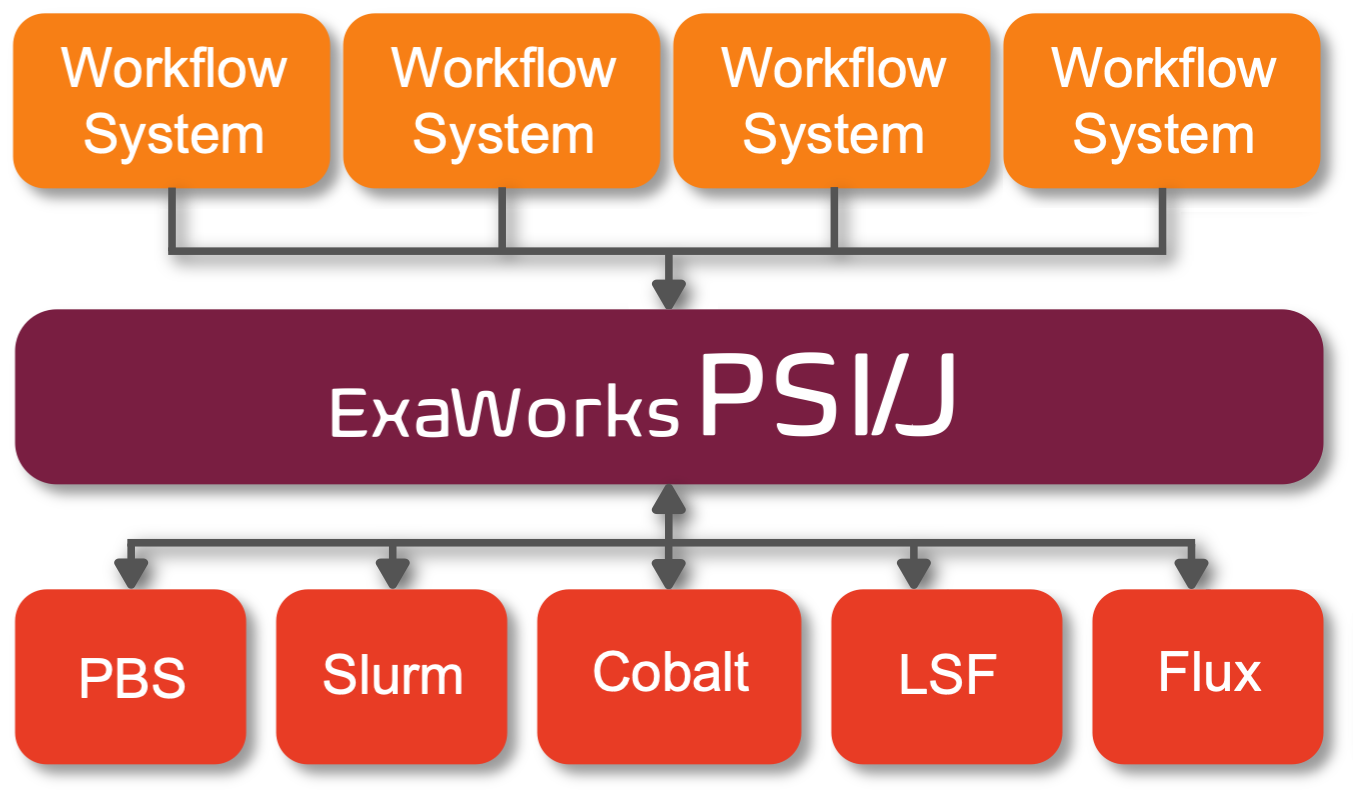
PSI/J (Portable Submission Interface for Jobs), is an abstraction layer over cluster job schedulers. It allows your application to be written in a way that is (mostly) independent of the cluster(s) where it runs. It is a language agnostic specification. PSI/J-Python is a Python implementation of PSI/J.
2.2.4.1. Installation
[1]:
%pip install git+https://github.com/ExaWorks/psij-python.git >/dev/null 2>&1
%pip show psij-python
Note: you may need to restart the kernel to use updated packages.
Name: psij-python
Version: 0.9.0
Summary: This is an implementation of the PSI/J (Portable Submission Interface for Jobs)         specification.
Home-page: https://github.com/exaworks/psij-python
Author: The ExaWorks Team
Author-email: hategan@mcs.anl.gov
License: UNKNOWN
Location: /home/docs/checkouts/readthedocs.org/user_builds/exaworkssdk/envs/hotfix-docs/lib/python3.7/site-packages
Requires: filelock, psutil, pystache, typeguard
Required-by:
Note: you may need to restart the kernel to use updated packages.
2.2.4.1.1. Overview
When running a job, there are a number of things to specify: - What is to be run, such as executable, arguments, environment, etc. (JobSpec) - What resources are needed by the job, such as the number of nodes (ResourceSpec) - Various miscellaneous properties, such as the queue to submit the job to (JobAttributes) - The mechanism through which to run the job, such as local/exec, SLURM, PBS, etc. (JobExecutor)
We also need an object to keep track of all this information, as well as the state of the execution. This object is an instance of a Job.
2.2.4.2. Setup
Before we start, let us create a separate directory so that we don’t ovewrite each others’ files
[2]:
import os
from tempfile import mkdtemp

os.makedirs('./userdirs', exist_ok=True)
workdir = mkdtemp(prefix='userdir-', dir='./userdirs')
os.chdir(workdir)
print(workdir)
./userdirs/userdir-r_nnfpes
2.2.4.3. Basic Usage
Without further ado, let’s create a simple job:
[3]:
from pathlib import Path
from psij import Job, JobSpec

job = Job(JobSpec(executable='/bin/date', stdout_path=Path('the-date.txt')))
Easy. We created a job that runs /bin/date and stores the output in the-date.txt. Now we need to run it. In order to do so, we need an executor that knows how to run jobs. We will use a simple fork/exec based executor named local. On a real cluster, we would use something like SLURM or LSF, but we are not doing this on a real cluster. However, I will note here that in most cases, simply changing local to the name of the scheduler used by the cluster would be sufficient
to run the job through the cluster scheduler.
[4]:
from psij import JobExecutor

executor = JobExecutor.get_instance('local')
We can now tell the executor to run our job
[5]:
executor.submit(job)
The submit() method starts the job asynchronously. We would now like to see the result. However, before we can do so, we must ensure that the job has actually finished running. We can do so by waiting for it:
[6]:
job.wait()
[6]:
<psij.job_status.JobStatus at 0x7fe1f42d19d0>
The wait() method returns the JobStatus. Since nothing can possibly go wrong, we will assume that the job completed successfully and that there is no need to check the status to confirm it. Now, we can finally read the output
[7]:
with open('the-date.txt') as f:
    print(f.read())
Fri Apr 21 03:59:24 UTC 2023
2.2.4.4. Multiple Jobs
Our executor is stateless. That means that we can submit as many jobs as we want to it. That’s in theory. In practice, computers have limited resources and there are only so many concurrent jobs that we can run, but hopefully we won’t hit those limits today.
[8]:
jobs = []
for i in range(10):
    job = Job(
        JobSpec(
            executable='/bin/echo',
            arguments=['Hello from job %s' % i],
            stdout_path=Path('hello-%s.txt' % i)
        )
    )
    executor.submit(job)
    jobs.append(job)
If these jobs weren’t so short, they would now be running in parallel. In fact, why not start a longer job:
[9]:
long_job = Job(JobSpec(executable='/bin/sleep', arguments=['600']))
executor.submit(long_job)
Back to our previous jobs. In order to read their outputs, we must, again, ensure that they are done
[10]:
for i in range(10):
    jobs[i].wait()
    with open('hello-%s.txt' % i) as f:
        print(f.read())
Hello from job 0

Hello from job 1

Hello from job 2

Hello from job 3

Hello from job 4

Hello from job 5

Hello from job 6

Hello from job 7

Hello from job 8

Hello from job 9
What about our long job?
[11]:
print(long_job.status)
JobStatus[ACTIVE, time=1682049564.709672]
Still running. The time shows the instant when the job switched to ACTIVE state. Moving on…
2.2.4.5. Multi-process Jobs
So far we’ve run multiple independent jobs. But what if we wanted to run multiple copies of one job, presumably on multiple compute nodes (this is a Docker container, but we can pretend)? We could tell PSI/J to do this using ResourceSpecV1. We also need to tell PSI/J to start our job a bit differently, so we’ll make a short detour to talk about launchers.
Once a job’s resources are allocated, a typical job scheduler will launch our job on one of the allocated compute nodes. Then, we’d invoke something like mpirun or srun, etc. to start all the job copies on the allocated resources. By default, PSI/J uses a custom launcher named single, which simply starts a single copy of the job on the lead node of the job. If we wanted to see multiple copies of the job without any of the fancy features offered by mpirun or srun, we could use
PSI/J’s multiple launcher, which we will do below.
[12]:
from psij import ResourceSpecV1

mjob = Job(
        JobSpec(
            executable='/bin/date',
            stdout_path=Path('multi-job-out.txt'),
            resources=ResourceSpecV1(process_count=4),
            launcher="multiple"
        )
    )
We informed PSI/J that we need four copies of our job. On a real scheduler, we could also request that these copies be distributed on multiple compute nodes, but, on this VM, we only have one such compute node, so we shoudn’t bother.
[13]:
executor.submit(mjob)
mjob.wait()
with open('multi-job-out.txt') as f:
    print(f.read())
Fri Apr 21 03:59:24 UTC 2023
Fri Apr 21 03:59:24 UTC 2023
Fri Apr 21 03:59:24 UTC 2023
Fri Apr 21 03:59:24 UTC 2023
2.2.4.6. MPI Jobs
The previous example ran a multi-process job, which has its use. It is more likely, however, to want to run an MPI job. Assuming that the system has some form of MPI installed, which this Docker container has, and which comes with some generic mpirun tool, we can instruct PSI/J to launch MPI jobs. And, as the previous sentence hints, it may be as simple as changing our launcher from multiple to mpirun, which it is.
But before that, we need a simple MPI executable.
[14]:
%%bash
cat <<EOF >hello.c
#include <stdio.h>
#include <mpi.h>

void main(int argc, char **argv) {
    int rank;
    MPI_Init(&argc, &argv);
    MPI_Comm_rank(MPI_COMM_WORLD, &rank);

    printf("Hello from rank %d\n", rank);

    MPI_Finalize();
}
EOF
Which we need to compile
[15]:
!mpicc hello.c -o hello
And now we can construct our job
[16]:
mpi_job = Job(
        JobSpec(
            executable='hello',
            stdout_path=Path('mpi-job-out.txt'),
            resources=ResourceSpecV1(process_count=4),
            launcher="mpirun"
        )
    )
… and, as usual, wait for it and display the output
[17]:
executor.submit(mpi_job)
mpi_job.wait()
with open('mpi-job-out.txt') as f:
    print(f.read())
Hello from rank 2
Hello from rank 0
Hello from rank 1
Hello from rank 3
And the long running job?
[18]:
print(long_job)
Job[id=a9f6ebd7-44d2-4962-9289-33654c049138, native_id=9546, executor=JobExecutor[local, 0.0.1], status=JobStatus[ACTIVE, time=1682049564.709672]]
Soon, soon…
2.2.4.7. Callbacks
Examples above are more or less synchronous, in that we use wait() to suspend the current thread until a job completes. In real life scenarios where scalability is needed, we would use callbacks. Let’s implement a quick map/reduce workflow. We’ll Monte Carlo calculate π using a map-reduce like algorithm.
The basic idea is to generate some random points on a square that encloses one quadrant of a circle.

Some points will fall outside the circle and some inside. As the number of points grows, the ratio of points inside the circle vs points inside the full square (total points) will be proportional to the ratio of their areas:
Ncircle / Ntotal ≈ Acircle / Asquare = (πr2 / 4) / r2
Hence
π = 4 Ncircle / Ntotal
We’ll start with some boilerplate, the number of iterations, and the radius of the circle
[19]:
from threading import Lock
from psij import JobState
import math

N = 100
R = 1000
Then, we’ll define a class that keeps track of our points and calculates π once we have all the points in, and we’ll create an instance of it to hold actual results.
[20]:
class Results:
    def __init__(self):
        self.n = 0
        self.inside = 0
        self._lock = Lock()

    def point_received(self, x, y):
        with self._lock:
            self.n += 1
            if math.sqrt(x * x + y * y) < R:
                self.inside += 1
            if self.n == N:
                print("π is %s" % (float(self.inside) / self.n * 4))

results = Results()
Then, we’ll define a callback function that gets invoked every time a job changes status, and have it read the output and pass it to the results instance. The output will be in the form x y
[21]:
def callback(job, status):
    if status.state == JobState.COMPLETED:
        with open(job.spec.stdout_path) as f:
            line = f.read().strip()
            tokens = line.split()
            results.point_received(int(tokens[0]), int(tokens[1]))
Unlike in previous cases, we now need to check the state of the job. That is because the full lifecycle of the job includes states such as QUEUED and ACTIVE, and the callback is invoked on all state changes.
Finally, we can create and submit our jobs
[22]:
for i in range(N):
    job = Job(JobSpec('echo', '/bin/bash',
                      ['-c', 'echo $((RANDOM%{})) $((RANDOM%{}))'.format(R, R)],
                      stdout_path=Path('pi-x-y-%s.txt' % i)))
    job.set_job_status_callback(callback)
    executor.submit(job)
Sure! Notice that the main thread is free as soon as the last job is submitted.
That’s about it for this tutorial. Oh, the long running job should be done now.
[23]:
print(long_job)
Job[id=a9f6ebd7-44d2-4962-9289-33654c049138, native_id=9546, executor=JobExecutor[local, 0.0.1], status=JobStatus[ACTIVE, time=1682049564.709672]]
If not, we can stop it
[24]:
long_job.cancel()
OK, now we’re really done. So it’s clean up time. And you know what they say, if all you have is a hammer…
[25]:
os.chdir('../../')
cleanup_job = Job(
    JobSpec(
        executable='/bin/rm',
        arguments=['-rf', workdir],
        directory=Path('.')
    )
)
executor.submit(cleanup_job)
Thank you!